
A card marker is one person who keeps score for a whole group. Instead of everyone tapping in their own numbers, the marker enters scores for the players in their group from a single phone. It is the natural way to run a society day, a fourball, or any group where not everyone wants to be on their phone.
Card markers are set up through groups, so put your players into groups first.
Make someone the card marker
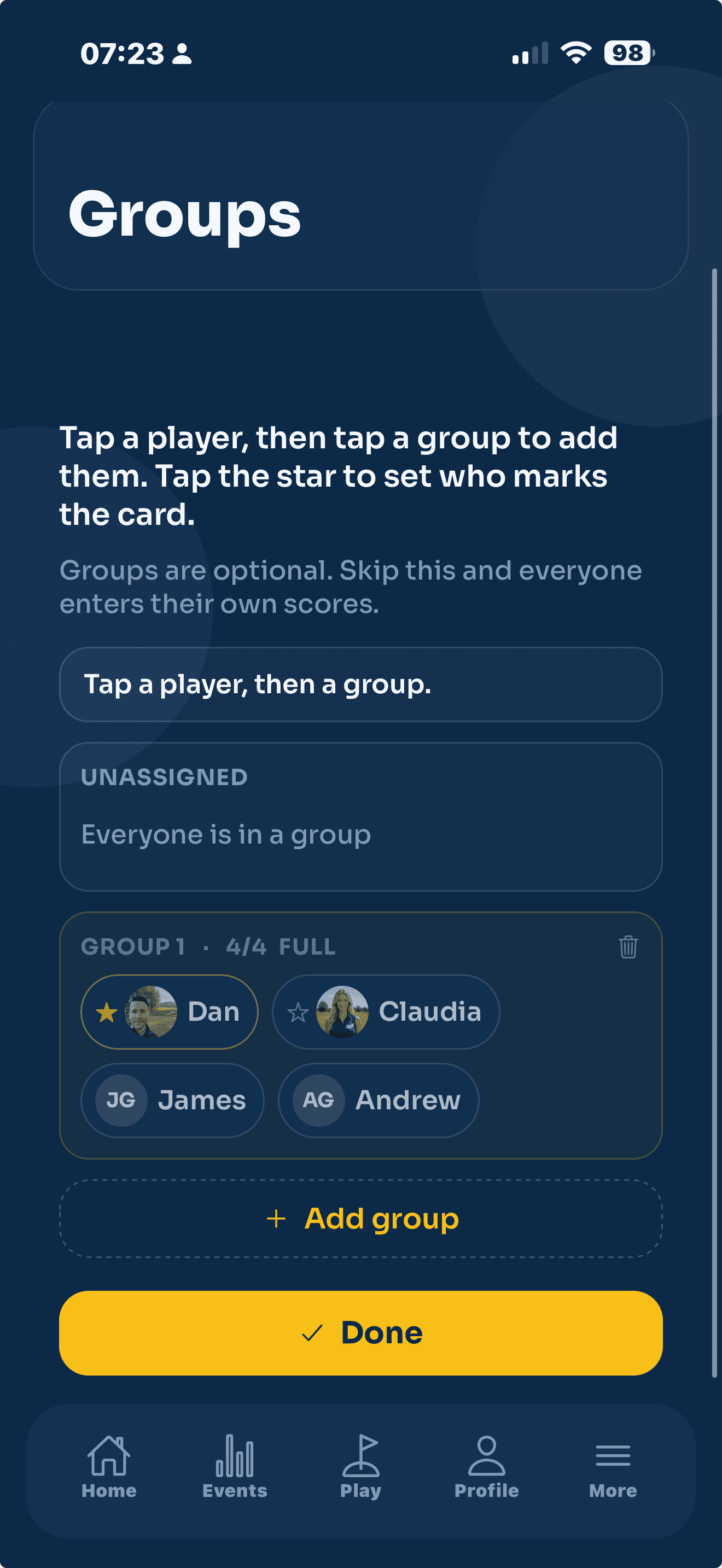
- Open your event and tap Groups.
- Find the group you want, and tap the star next to the player who will keep score.
- That player is now the marker for the group. On the day they enter scores for everyone in it.
The players being marked do not need to do anything. On their own screen they simply see "Your card is being marked by ...", and they can watch the live leaderboard.
Card markers and guests
A guest always needs a marker, because a guest has no account to enter their own scores. When you add a guest you choose the member who marks them under Marked by. That member must be in the same group as the guest.
If a player is already marking a guest and you want to change things, reassign the guest to someone else first. That keeps every guest attached to a real marker at all times.
On the day
The marker opens the event, taps into the leaderboard, and enters each hole for the group. Everyone else, members and guests alike, appears on the board as the scores go in. There is nothing to hand back and forth: one card, one phone, the whole group scored.